CPU Cores vs GPU Cores: Why the Numbers Don't Compare
Nerdivation · Published · Updated
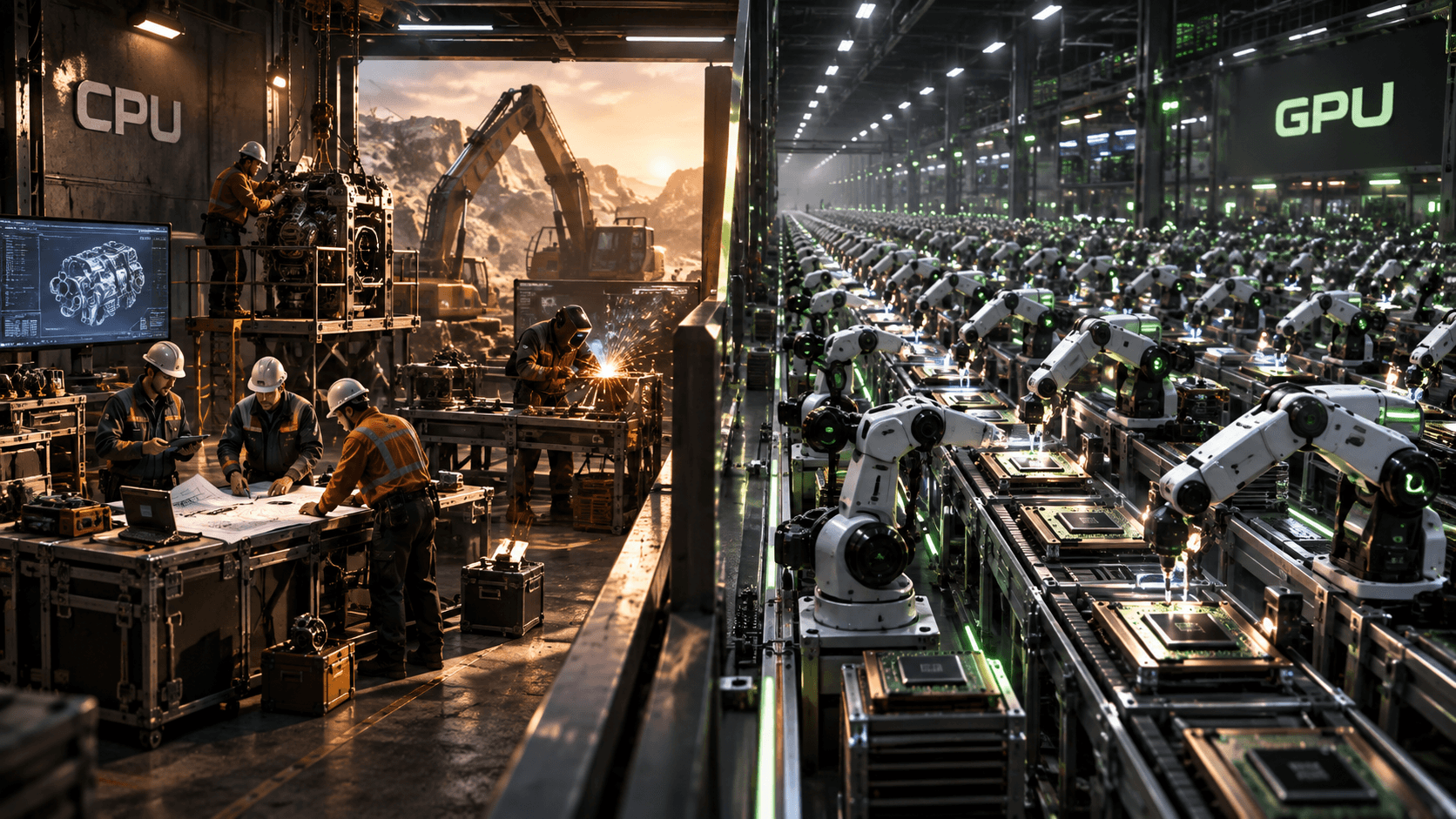
A modern desktop CPU might have 8, 16, or 24 cores. A graphics card can advertise thousands, or even tens of thousands, of processing cores.
So this should be an easy comparison, right?
If one processor has 16 cores and another has 10,000, the second one should be hundreds of times more powerful.
Except it isn't.
Not even close.
The problem is that a CPU core and what manufacturers call a GPU “core” are not the same kind of thing.
They don't have the same capabilities. They aren't organized the same way. They don't execute work the same way. And depending on whether you're looking at NVIDIA, AMD, or Intel, the word core may not even refer to the same level of the GPU.
Comparing the two by core count is a little like comparing a construction company with 16 fully equipped crews against a factory with 10,000 individual power tools.
Yes, 10,000 is a much bigger number.
But you haven't actually compared the same thing.
The word “core” is doing way too much work
In CPU terminology, a core is a remarkably complete little computer. A modern CPU core can independently fetch instructions, decode them, schedule work, perform calculations, access caches, predict which branch of a program is likely to execute next, rearrange instructions when useful, and recover when those predictions are wrong.[1]
It is designed to handle an unpredictable stream of instructions with as little delay as possible.
A GPU is built around a different philosophy. Instead of making a relatively small number of cores extremely sophisticated, a GPU dedicates much more of its hardware to performing enormous amounts of arithmetic in parallel.
That difference is the reason GPUs can dominate workloads such as graphics rendering, matrix multiplication, image processing, and many scientific calculations.
It's also why simply putting the CPU and GPU core counts next to each other tells you almost nothing useful.
Imagine two construction companies
Suppose you're building houses.
Company A has 16 construction crews. Every crew arrives with electricians, plumbers, carpenters, heavy equipment, supervisors, blueprints, diagnostic tools, and the ability to adapt when something goes wrong.
You can hand each crew a different problem. One can repair a foundation, another can wire a kitchen, and another can redesign a staircase because somebody measured it incorrectly.
They're expensive, complicated, and extremely capable.
Now imagine Company B.
Company B has 10,000 workers standing along an enormous assembly line. Each person performs a much smaller operation: one drills, one cuts, one welds, one measures.
Individually, none of them is comparable with one complete construction crew.
But there is an important catch: those workers are not all behaving like 10,000 independent construction crews.
GPU arithmetic lanes are organized into tightly coordinated groups. Many of them execute the same instruction across different pieces of data at the same time.
So instead of imagining 10,000 workers each making their own decisions, imagine rows of workers moving through the same step of an assembly process together.
Give that factory one million similar parts that all need the same operations, and Company B becomes terrifyingly fast.
That's much closer to the CPU-versus-GPU distinction. The CPU has relatively few powerful general-purpose cores, while the GPU has a huge amount of arithmetic hardware designed to attack many pieces of similar work at once.
What is actually inside a CPU core?
Calling a CPU core “powerful” can sound vague, so let's look at what that power is being spent on.
A modern CPU constantly deals with code that looks something like this:
Load this value.

Check whether it is greater than 10.

If it is, run function A.

Otherwise, run function B.

Function B needs some data from memory.

While we're waiting for that data, see if some later instructions can run.

Oh, and the branch prediction was wrong.

Undo the speculative work and start down the correct path
That sounds chaotic because real software often is.
Operating systems, browsers, games, compilers, databases, and desktop applications contain complicated instruction streams with dependencies, branches, memory accesses, function calls, and interruptions.
A CPU core contains substantial hardware dedicated to coping with that chaos. Modern CPUs use techniques such as:
- Branch prediction to guess which path code will take.
- Out-of-order execution to run useful instructions while others are stalled.
- Large caches to keep frequently needed data close to the processor.
- Instruction scheduling to decide which operations are ready to execute.
- Speculative execution to begin work before the processor knows for certain that the result will be needed.
- Vector execution units to process multiple data elements with one instruction.
That last point matters.
CPUs are not purely serial machines that operate on one number at a time. A modern CPU core can perform substantial parallel work using SIMD vector instructions, multiple execution units, multiple instructions in flight, and, on some processors, dedicated matrix hardware.[1]
The difference is not:
CPU = one thing at a time
GPU = many things at a time
The better distinction is:
A CPU devotes more hardware to making a smaller number of complex instruction streams fast and flexible. A GPU devotes more hardware to maximizing throughput across a much larger amount of parallel work.
A GPU spends its silicon differently
A GPU faces a very different problem.
Imagine rendering a frame in a game. Millions of pixels need calculations, huge numbers of vertices need transformations, textures need sampling, and lighting equations need evaluation.
Many of those operations are similar.
Instead of building each execution lane into an independent master problem-solver, GPU designers group large amounts of arithmetic hardware together and feed related operations through it.
That makes each individual arithmetic lane simpler than a complete CPU core, but allows the chip to contain far more arithmetic capability overall.
This is why a GPU can advertise an enormous number of processing resources without physically containing thousands of miniature desktop CPUs.
It is not simply a CPU scaled up.
It is a machine built around a different strategy.
So what is a “CUDA core”?
This is where marketing terminology starts causing trouble.
On NVIDIA GPUs, you'll frequently see specifications listing thousands of CUDA cores. Despite the name, a CUDA core is not remotely equivalent to a CPU core.
A CUDA core is better thought of as an FP32 arithmetic execution resource inside NVIDIA's larger GPU architecture, rather than as an independently scheduled processor. [2]
Those arithmetic resources live inside larger structures called Streaming Multiprocessors, or SMs. An SM contains considerably more than arithmetic lanes. It includes scheduling hardware, registers, caches, shared memory, load/store resources, and other execution hardware. [2]
Software threads are organized into groups called warps. On NVIDIA CUDA GPUs, a warp contains 32 threads.
Those threads follow a SIMT, or single instruction, multiple threads, execution model. In practical terms, threads in a warp usually move through the same instruction stream while operating on different pieces of data. [3]
So the hierarchy is closer to:
GPU
↓
Streaming Multiprocessors
↓
Execution resources
↓
CUDA cores / arithmetic lanes
That is very different from:
CPU
↓
CPU core
Those aren't comparable levels of machinery.
Even the term CUDA core has become less useful as a cross-generation performance metric. NVIDIA has reorganized floating-point and integer execution resources across architectures, so a CUDA-core count should be read as one architectural specification, not as a universal number of identical miniature processors. [2]
And NVIDIA's terminology isn't universal
Here's where comparing GPU specifications becomes even more dangerous.
NVIDIA, AMD, and Intel do not describe their GPU architectures with one standardized unit called a “GPU core.”
NVIDIA organizes execution hardware into Streaming Multiprocessors, or SMs.
AMD organizes much of its GPU execution hardware into Compute Units, or CUs. [4]
Intel uses Xe-cores, which themselves contain multiple vector engines and, in several designs, matrix-processing hardware. [5]
At a very high level, an NVIDIA SM, an AMD Compute Unit, and an Intel Xe-core occupy a similar place in their respective GPU hierarchies. Each is a larger execution block that groups multiple arithmetic resources under shared scheduling and local hardware.
But they are not architecturally equivalent.
They differ in execution width, scheduling, register organization, cache structure, local or shared memory, instruction capabilities, matrix hardware, thread grouping, and how arithmetic resources are counted.
Below those larger blocks are the individual arithmetic resources that marketing often turns into giant “core” numbers.
NVIDIA calls many of these CUDA cores. AMD commonly refers to large numbers of stream processors inside its broader Compute Unit organization. Intel's published Xe-core count refers to a much larger block than one NVIDIA CUDA core.
So statements like:
GPU A has 6,000 cores while GPU B has 4,000 cores, therefore GPU A is faster.
can be meaningless even before we consider clock speed, memory bandwidth, cache, architecture, or workload.
You may not even be counting equivalent pieces of hardware.
THE CORE COUNT TRAP
16 CPU cores ≠ 16 GPU arithmetic lanes
10,000 NVIDIA CUDA cores ≠ 10,000 Intel Xe-cores
10,000 GPU arithmetic resources ≠ 10,000 independent processors
The word core only becomes useful when you know exactly what the manufacturer is counting.
Even GPUs from the same company can't always be compared by core count
Suppose we're careful and compare only NVIDIA GPUs.
Surely CUDA core counts are comparable now.
Better, but still not enough.
A newer GPU architecture may change how instructions are issued, how floating-point and integer units are organized, cache sizes and behavior, clock speeds, memory bandwidth, scheduling, ray-tracing hardware, matrix-processing hardware, supported numerical formats, and the amount of useful work performed per clock.
That means doubling one specification does not guarantee doubling real-world performance.
Think about cars.
Two engines might both have eight cylinders. That does not mean they produce the same horsepower.
Cylinder count tells you something about the engine's construction, but it does not completely describe its performance.
GPU core count works similarly.
It is an architectural specification, not a universal performance score.
Clock speed doesn't rescue the comparison
You might think:
Fine. I'll compare cores and clock speed.
Unfortunately, now we're multiplying two numbers that still don't describe equivalent hardware.
Imagine, purely as an illustration, comparing a 5 GHz CPU core with a 2.5 GHz GPU execution resource.
Those clocks are attached to fundamentally different machines.
Clock speed tells you how many clock cycles occur each second. It does not tell you how much useful work a processor performs during each cycle.
Different architectures may execute different numbers of operations per cycle, operate on different amounts of data per instruction, support different precision formats, use different cache systems, spend different amounts of time waiting for memory, or contain specialized hardware for particular operations.
This is why:
core count x clock speedis not a universal processor-performance equation.
It looks beautifully scientific.
It is also missing most of the information that matters.
Why GPU arithmetic lanes work so well together
The GPU's advantage comes from parallelism.
Imagine applying the same color transformation to one million pixels. Each pixel might require essentially the same calculation:
new_pixel = old_pixel x adjustmentPixel number 57 does not necessarily need to wait for pixel number 56.
That means the problem can be divided into huge numbers of independent pieces, and the GPU can send those pieces through many arithmetic lanes simultaneously.
This is sometimes described as data parallelism: perform similar operations across a large dataset.
But again, those lanes are not independently running arbitrary programs.
On NVIDIA hardware, threads are grouped into 32-thread warps. AMD uses a related concept called a wavefront, with grouping details that vary by architecture. [3, 4]
Those groups are designed to execute related work efficiently together.
And that is where the GPU's enormous amount of arithmetic hardware suddenly makes sense.
It isn't trying to make one thread unbelievably powerful.
It is trying to keep a massive amount of related arithmetic work moving at once.
What happens when those threads disagree?
This is one of the reasons GPU execution is different from having thousands of independent CPU cores.
Imagine a warp of threads processing pixels. Half the pixels need one operation, while the other half need something different.
Conceptually:
if pixel is bright:
	run path A
else:
	run path B
Now the threads no longer agree on what instruction should happen next.
The GPU can still execute the code, but efficiency can drop because not every execution lane is doing useful work during every instruction path.
This is known as branch divergence. [3]
Modern GPUs have sophisticated ways of handling divergence, and implementations have evolved significantly across generations. But the basic lesson remains:
Can I see player?

If yes:
	Is the player close enough to attack?

	if yes:
		Attack.
	Else:
		Find a path toward the player
If no:
	Continue searching.
Now the program contains decisions. Different objects may follow different paths, one calculation may depend on the result of another, and data may be scattered throughout memory.
The workload becomes less regular.
This is exactly where sophisticated CPU cores shine. Their elaborate scheduling, caching, and prediction hardware helps each core navigate complicated instruction streams while keeping latency low.
The CPU isn't losing because it has fewer cores.
Those cores are built to solve a different class of problem.
A GPU's thousands of arithmetic resources can sometimes sit around doing very little
This sounds strange.
If a GPU has enormous parallel capacity, why wouldn't it always use all of it?
Because the application must provide enough parallel work.
Imagine owning a factory with 10,000 workstations but receiving an order for eight parts. The factory is enormous, but the order is tiny.
Most of your factory sits idle.
The same problem can occur on a GPU. If a workload contains only a small amount of parallel work, thousands of arithmetic resources do not magically make the program fast.
There may also be dependencies:
Calculate A.

Use A to calculate B.

Use B to calculate C.

Use C to decide whether D should run.
You cannot simply distribute all four operations to different workers at the same time.
B doesn't know what to do until A finishes. C doesn't know what to do until B finishes.
The problem itself limits the amount of parallelism available.
And even a large dataset does not guarantee perfect utilization. Divergence, synchronization, register usage, memory behavior, and other resource limits can reduce how much of the GPU stays busy. [3, 6]
That is why more cores do not automatically mean more performance.
There's another bottleneck: feeding all those workers
Imagine we actually give our 10,000-worker factory a huge job.
Great.
But now every worker needs a new piece of material every few seconds. If the loading dock cannot deliver material quickly enough, workers begin waiting.
At that point, hiring another 5,000 workers accomplishes very little.
The factory isn't limited by workers anymore.
It's limited by its supply system.
GPUs face the same problem with memory. Thousands of arithmetic resources need an enormous flow of data.
This is one reason GPUs use high-bandwidth memory systems and why memory bandwidth can matter so much to GPU performance.
The chip may theoretically be capable of an enormous amount of arithmetic, but that ability is useless if data cannot arrive fast enough. [6]
But GPUs have another trick: hide the waiting
GPUs do not solve memory latency only by making memory faster.
They also keep many groups of threads ready to run. If one warp stalls while waiting for data, the GPU scheduler can often issue work from another ready warp. [3]
The goal is not necessarily to make every memory access fast.
The goal is to make sure the machine still has something useful to do while some threads are waiting.
This is one reason GPUs maintain large register files and support many resident threads.
The concept is called latency hiding.
A useful way to think about it is:
Bandwidth determines how much data the loading dock can deliver. Latency hiding determines whether the factory can keep working while individual deliveries are late.
But latency hiding has limits.
If too few warps are ready, or the workload consumes too many resources to keep many warps resident, the hardware may run out of useful work to schedule.
That is one reason simply having thousands of arithmetic lanes is not enough.
You also have to keep them fed.
Specialized hardware complicates the comparison even further
Modern GPUs aren't made only of general-purpose shader arithmetic.
They may also contain dedicated hardware for:
- Matrix operations
- Ray tracing
- Texture sampling
- Video encoding
- Video decoding
- Display processing
- AI workloads
NVIDIA's Tensor Cores, for example, accelerate certain matrix operations used heavily in machine learning. [6] Modern AMD GPUs also include specialized matrix, AI, media, and ray-tracing resources depending on the architecture. [7]
Intel Xe GPUs combine vector engines with matrix engines and other dedicated hardware. [5]
So even if two GPUs had identical numbers of ordinary arithmetic lanes, one could dramatically outperform the other in a specific workload because of specialized hardware elsewhere on the chip.
This gives us an important rule:
Performance depends on which part of the processor your workload can actually use.
A game making heavy use of ray tracing is not exercising the chip in exactly the same way as a machine-learning model performing matrix multiplication.
And neither is exercising it exactly like a traditional rasterized graphics workload.
Software can matter almost as much as hardware
For gaming, drivers and game engines determine how effectively hardware is used.
For compute workloads, the software ecosystem can matter even more.
A GPU may look excellent on paper, but performance can depend heavily on driver quality, compiler support, libraries, framework compatibility, kernel optimization, vendor-specific APIs, and application support.
For machine learning, scientific computing, rendering, and engineering workloads, software support can sometimes matter more than a modest difference in arithmetic-unit count.
A GPU that is theoretically faster but poorly supported by the software you need may be the slower practical choice.
That is another reason specifications should never be interpreted in isolation.
This is why TFLOPS doesn't completely solve the problem either
Instead of counting cores, perhaps we should measure mathematical throughput.
That's where specifications like TFLOPS come in.
A teraflop represents one trillion floating-point operations per second.
That sounds much more useful than core count.
And it is.
But it still isn't a universal performance score.
A peak TFLOPS figure depends on numerical precision, the arithmetic being measured, whether the workload can keep the execution hardware occupied, memory bandwidth, cache behavior, specialized execution hardware, and software optimization. [6]
A GPU capable of enormous theoretical compute throughput may never reach that number in your application.
Peak throughput is a ceiling.
Real workloads live below it.
So what specifications should you actually compare?
There isn't one magic number.
For GPUs, useful specifications can include:
- Architecture
- SM / Compute Unit / Xe-core configuration
- Arithmetic-lane count
- Clock speed
- Memory capacity
- Memory bandwidth
- Cache
- Texture hardware
- Ray-tracing hardware
- Matrix/AI hardware
- Power limits
- Numerical precision
- Software support
But benchmarks remain incredibly important because they measure how all of those systems work together on an actual workload.
If you're buying a graphics card for gaming, look at gaming benchmarks in the games and resolutions you care about.
If you're buying hardware for Blender, examine Blender performance.
If you're training neural networks, look at the models and numerical formats relevant to your work.
If you're running scientific code, benchmark the actual algorithm whenever possible.
Architecture explains why performance behaves the way it does.
Benchmarks tell you what happened when all those architectural trade-offs met a real workload.
The same warning applies to CPUs
CPU core count isn't meaningless either.
Moving from four capable cores to eight can provide a huge improvement when software can use the additional threads.
But CPU performance still depends on far more than the number printed on the box.
Two CPUs with the same core count can differ because of instructions per clock, clock speed, cache, memory latency, branch prediction, vector hardware, matrix hardware, power limits, core design, process technology, and software scheduling.
Modern CPUs may also mix different kinds of cores, such as high-performance and efficiency-oriented designs. [8]
That makes a label like 16-core CPU less descriptive than it once was.
Again, the count is a useful architectural fact.
It just isn't a complete performance measurement.
CPU and GPU hierarchy at a glance
Level | CPU | NVIDIA | AMD | Intel GPU |
|---|---|---|---|---|
Large execution block | CPU core | Streaming Multiprocessor (SM) | Compute Unit (CU) | Xe-core |
Contains | Full general-purpose execution engine | Many arithmetic and supporting resources | Many arithmetic and supporting resources | Multiple vector/matrix engines and shared resources |
Small arithmetic resource | ALUs/vector lanes inside the CPU core | CUDA cores / arithmetic lanes | Stream-processing arithmetic resources | SIMD lanes inside vector engines |
Individually comparable across vendors? | Only with context | No | No | No |
Main design emphasis | Low latency and flexible control | Parallel throughput | Parallel throughput | Parallel throughput |
The important part is not memorizing the names.
It's understanding the levels.
A CPU core is much closer to a complete independent processing engine.
The giant “core” numbers advertised for GPUs usually count much smaller arithmetic resources inside larger scheduling blocks.
That is why putting the numbers side by side is misleading.
The question to ask instead
Don't ask:
How many cores does it have?
Ask:
What kind of hardware is being counted, what kind of work can it perform, and can my workload keep that hardware busy?
That's a much better question.
It explains why a CPU with a few dozen cores can outperform a GPU with thousands of arithmetic lanes on one workload and get absolutely demolished by that same GPU on another.
It also explains why core-count comparisons across NVIDIA, AMD, and Intel can become misleading so quickly.
They aren't simply building different quantities of the same thing.
They're building different machines.
The one-sentence explanation
A CPU core is a powerful, highly independent general-purpose processor. A GPU's advertised “cores” usually refer to much smaller arithmetic resources operating inside larger parallel execution blocks, and different GPU vendors do not necessarily count the same thing.
So when a specification sheet says:
16 CPU cores
and:
10,000 GPU cores
you aren't looking at a 625-to-1 performance advantage.
You're looking at two completely different architectural strategies represented by numbers that happen to share the same word.
And that is why the numbers don't compare.
Where to go next
For the broader architectural picture, read Why GPUs Are So Much Faster Than CPUs, where we look at latency, throughput, memory behavior, branch divergence, and why a GPU can dominate one workload while losing badly at another.
From here, three questions naturally follow:
- What Are CUDA Cores?
- What Is Parallel Processing?
- What Is a Teraflop, and Why Doesn't It Tell You Everything About GPU Performance?
Each digs deeper into one of the specifications that makes GPU comparisons look simpler than they really are.
Sources
Source | Supports |
|---|---|
1. Intel: Intel 64 and IA-32 Architectures Optimization Reference Manual | CPU instruction processing, branch prediction, execution resources, SIMD, and matrix operations. The linked page provides Volume 1. |
CUDA cores, SM organization, and changes to floating-point and integer execution resources between Turing and Ampere. | |
3. NVIDIA CUDA Programming Guide: Advanced Kernel Programming | Warps, SIMT execution, branch divergence, warp scheduling, registers, and shared-memory resource limits. |
Compute units, wave32 and wave64 execution, and GPU resource utilization. | |
Xe-core organization, vector engines, matrix engines, caches, and specialized graphics hardware. | |
Arithmetic throughput, numerical formats, Tensor Cores, memory bandwidth, and limits caused by insufficient parallelism. | |
Examples of AMD’s specialized AI, matrix, ray-tracing, media, and display capabilities. | |
Performance-cores and Efficient-cores within the same CPU. |